
Typical limitation
ChatGPT forgets you. Every new chat starts from zero.
OpenClaw answer
OpenClaw keeps persistent memory so it learns your projects, style, and recurring tasks over time.
OpenClaw Installation Fuquay-Varina
OpenClaw is a private, self-hosted AI system installed on your own hardware or VPS, connected to chat apps like WhatsApp, Telegram, and Slack, with persistent memory and real automation.
If you have searched for "AI assistant setup near me" or private AI setup North Carolina, this is the local service designed for that exact use case.
Desktop and Mobile Chat
Live Assistant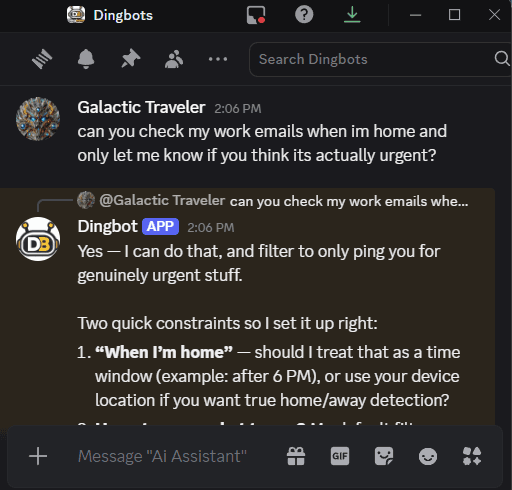
Why This Is Different
Most people already know what consumer AI chatbots feel like. OpenClaw fixes the exact limits people run into first.
Typical limitation
ChatGPT forgets you. Every new chat starts from zero.
OpenClaw answer
OpenClaw keeps persistent memory so it learns your projects, style, and recurring tasks over time.
Typical limitation
ChatGPT lives in a browser tab that you have to visit.
OpenClaw answer
OpenClaw meets you where you already message: WhatsApp, Telegram, Slack, Discord, Signal, and more.
Typical limitation
ChatGPT mostly gives answers, not completed work.
OpenClaw answer
OpenClaw can browse sites, collect information, read and write files, and run scripts inside the permissions you approve.
Typical limitation
ChatGPT runs on someone else's stack with fixed boundaries.
OpenClaw answer
OpenClaw runs on yours. You choose the hardware, provider, privacy settings, and guardrails.
OpenClaw is not a chatbot. It is an AI rig, and you own the whole thing.
Capabilities
A practical AI assistant setup near me should feel useful on day one. These are real tasks people hand off immediately.
Message it from WhatsApp or Slack the same way you would text a coworker. Ask it to check something, draft a reply, or pull a document without switching apps.
Persistent memory means it knows your preferences, your projects, and your recurring asks. You do not start from zero every conversation.
It can visit sites, pull information, and work through form-heavy tasks. Useful for price checks, vendor research, and routine online admin work.
Read documents, write files, and run shell commands with configurable guardrails. You decide how much system access is allowed.
Use community skills or custom tools to create repeatable workflows. If your team repeats the same process every week, it can become one command.
Install on a MacBook, PC, or VPS. Pick your model and provider. No dependency on a single hosted platform.
What You Get
Clear scope, hands-on setup, and support after install day.
We confirm your goals, your device, and your setup. You know the scope before we arrive.
We install OpenClaw, connect your chat apps, configure security settings (least privilege and sandboxing where appropriate), and verify everything works.
We do not install and leave. We walk through your first commands, common use cases, and where the guardrails are.
Use your included support hour any time after install for troubleshooting, usage questions, or workflow guidance.
Pricing
Standard local install
$250
Additional support is available at an hourly rate. Contact us for current pricing.
Request an InstallWho This Is For
You have tried ChatGPT and want something more capable, more private, and more integrated into daily life. You want an assistant that remembers you, works from your phone, and can do real tasks. We set it up on your MacBook or PC, walk through everything hands-on, and make sure you are comfortable before we leave.
You know AI can help operations, but there is no dedicated IT team to run the project. We install OpenClaw, configure it for your team, build workflows around your real processes, and document everything so it is maintainable. We support solo operators up through teams of 20+.
Visit AI for BusinessFAQ
Straight answers so you know exactly what to expect.
OpenClaw is self-hosted, can keep persistent memory, works from your chat apps, and can take real actions like browsing, file work, and scripts. You control the data and the guardrails.
No. We handle installation and configuration, then walk you through day-to-day usage so you know how to use it confidently.
OpenClaw supports multiple providers and models. During setup, we help you choose the option that matches your budget, privacy needs, and task types.
Yes. We offer AI strategy consultations and workflow audits for businesses, then recommend a practical rollout path based on what will save time first.
The $250 service includes up to 1 hour on-site installation plus 1 hour of free post-install technical support after your appointment.
Major hardware changes, advanced custom development, and support beyond the included hour are not included. Extra support is optional and billed at the posted add-on rate.
We're based in Fuquay-Varina, NC. Primary service areas are listed below. If you are nearby, contact us and we will confirm whether on-site service is available.
Yes. Remote setup and troubleshooting are available when on-site service is not required.
Yes. OpenClaw can be connected to popular chat apps so you can interact with it in DMs or group chats. We will confirm what platforms you want to use and set it up with the right permissions.
Yes. OpenClaw can be installed on a MacBook, Windows PC, or Linux machine, and we can also deploy it to a VPS. For security, using your main computer is not recommended. Bring a dedicated laptop or spare PC when possible so it runs in a cleaner, separated environment.
Yes. We can install and configure OpenClaw on a VPS for remote access or multi-user needs, then lock down access, document the setup, and explain ongoing maintenance.
Yes. We offer AI strategy consultations and workflow audits, then help with deployment, custom skills, and team rollout. See the AI Integration section above.
We collect only the information needed to schedule and deliver service. We apply least-privilege configuration, avoid unnecessary data handling, and can recommend safer install options (dedicated device, separate user account, or VPS) depending on your needs.
If you cancel with reasonable notice, we can reschedule or discuss refunds case-by-case. Completed on-site labor and consumed time are non-refundable.
Most installs are scheduled within a few business days, depending on location and calendar availability.
Yes. Business engagements can include invoices, scoped deliverables, and handoff documentation.
Request an Install
Book your install from the dedicated request page.
Share your setup details, preferred timing, and what you want OpenClaw to handle first. We will follow up with clear next steps.